
Email outreach and B2B prospecting, built into your inbox
Find the right companies, clean your lists, write sequences that follow up on their own, and watch who replies — all from the GreenmorMail mailbox you already send from. No second tool, no second bill, no data to keep in sync.
- No extra subscription
- Lists verified before you send
- Paced sending, built-in suppression
Outreach, end to end, in three and a half minutes
From describing the people you want to reach, through writing and sending the sequence, to reading who actually replied — every screen in this video is the real product.
3:31 · no sign-up needed to watch
Everything outreach needs, in one place
From finding prospects to tracking replies, Outreach handles the whole campaign lifecycle inside your mailbox — not in a separate tool you have to buy, learn and reconcile.
Prospecting
Describe the businesses you want to reach — industry, city, size, a condition in plain English — and get back verified business contacts that match.
Campaigns
Multi-step sequences with conditional follow-ups, built from blocks or drafted by AI, previewed on desktop, tablet and mobile before they go.
Analytics
Delivered, opened, clicked, replied, bounced and unsubscribed — for the campaign and for every step inside it, with a Hotlist of your warmest contacts.
Lists
Paste, import or pull from Contacts, then verify every address for syntax and MX records. Hotlist and Suppressed lists build themselves.
Custom fields
Carry company, job title, city, website or anything else beside each contact, and drop it into a message wherever you want it to appear.
Triggers
Enrol people automatically when they fill in a form on your website — one snippet, works with the form you already have.
Five steps, one mailbox
Outreach is not a separate product bolted on to your email. It runs on the same login, the same contacts and the same sending reputation you have already built.
Describe who you want to reach
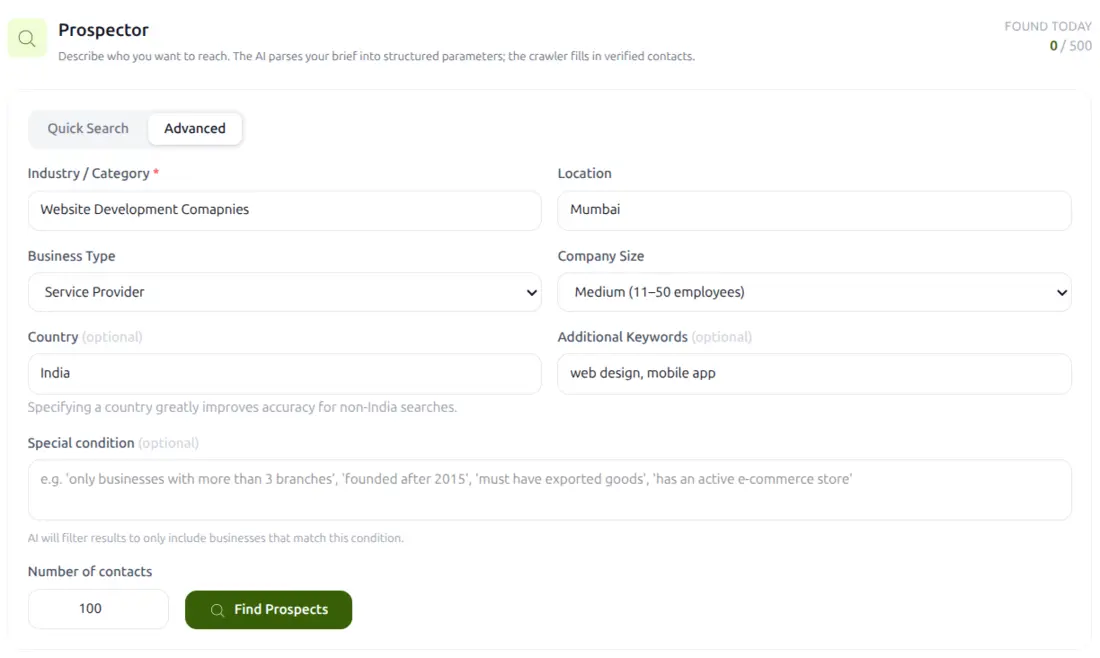
Prospecting starts with a description, not a database. Name the industry, the city and the size of company you are after, add a few keywords, and the AI turns your brief into structured search parameters. The crawler then goes and fills in verified business contacts.
- Filter by industry, location, business type, company size and country
- Add a special condition in plain English to narrow the results further
- Ask for as many or as few contacts as you need
Or bring a list you already have
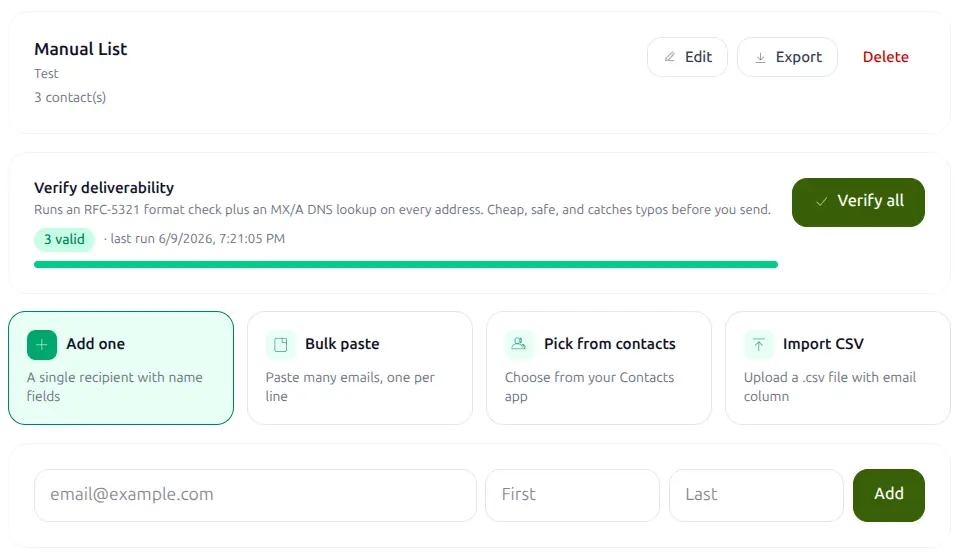
Paste addresses in, import a CSV, or pull straight from your GreenmorMail contacts. Whatever the source, you can verify the whole list before a single message leaves — an RFC 5321 format check plus an MX and A record lookup on every address.
- Add one at a time, bulk paste, pick from contacts, or upload a CSV
- Catch typos and dead inboxes before they cost you a send
- Keep as many separate lists as your campaigns need
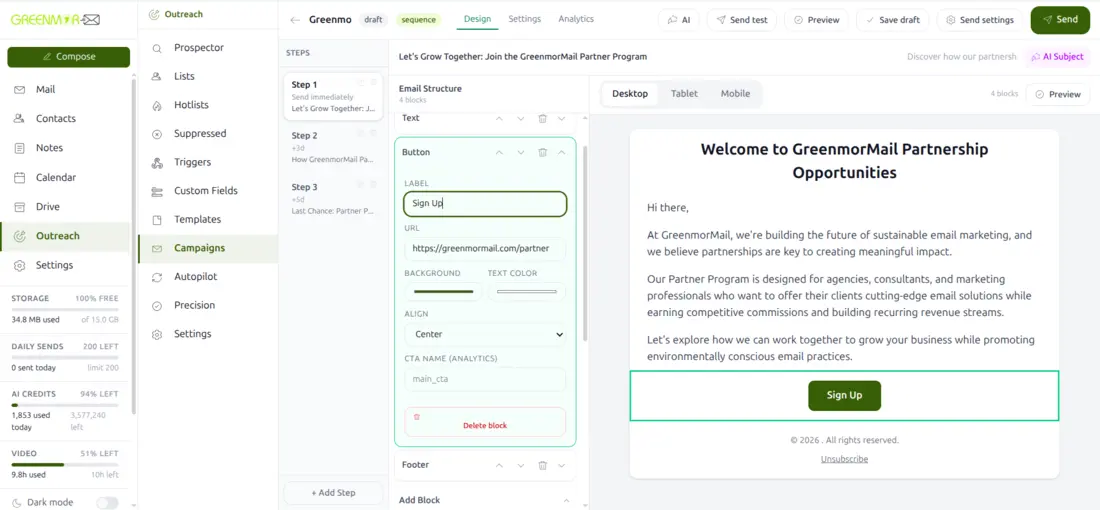
Write the campaign
A campaign is rarely a single email. Add a second step three days later and a third after five, and set each one to go only if there has been no reply. Every message is built from blocks — a heading, some text, an image, a button — and checked on desktop, tablet and mobile before it leaves.
- Start from a ready layout: welcome, newsletter, promotion, re-engagement and more
- Or describe the campaign and let the AI draft a single email or a three-step sequence
- Conditional follow-ups that stand down the moment somebody replies
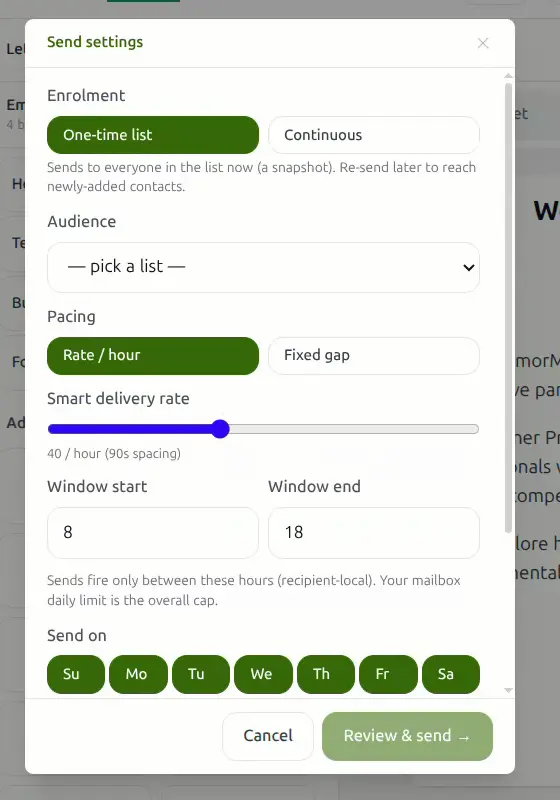
Decide how it goes out
Sending two hundred emails at once is how you end up in a spam folder. Outreach spaces them out for you: choose a rate per hour or a fixed gap, keep sends inside working hours, and pick the days of the week they are allowed to go.
- One-time list, or continuous enrolment that picks up contacts as you add them
- Smart delivery rate, sending window and per-day control
- Track opens and clicks, add an unsubscribe link, send follow-ups as a reply to the first email
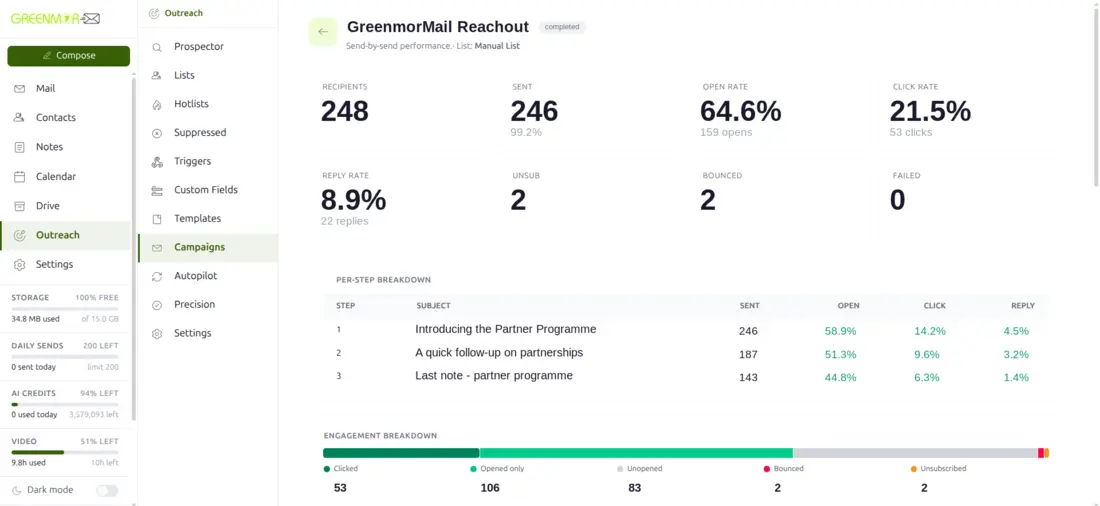
See what actually worked
Delivered, opened, clicked, replied, bounced, unsubscribed — for the campaign as a whole and for every step inside it. So you can tell whether it was the subject line, the third follow-up, or the list itself that did the work.
- Per-step breakdown of sends, opens, clicks and replies
- Engagement split across clicked, opened, unopened, bounced and unsubscribed
- Send-by-send performance, tied back to the list it ran on
Three ways to run outreach
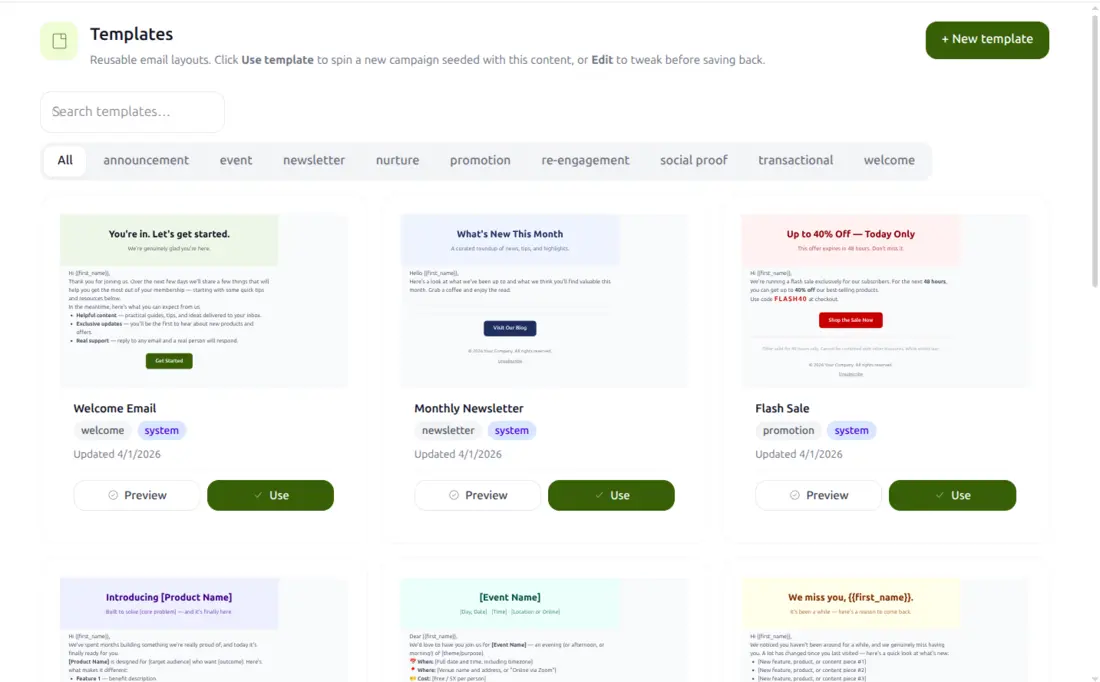
The same mailbox, the same lists and the same analytics — you simply decide how much of the writing and the scheduling you want to hand over.
 You drive
Manual campaigns
Build the sequence yourself. Pick a layout or start from a blank page, write each step, set the delays and the reply conditions, then choose exactly how it sends. Full control, nothing automatic you did not ask for.
 AI writes each one
Precision
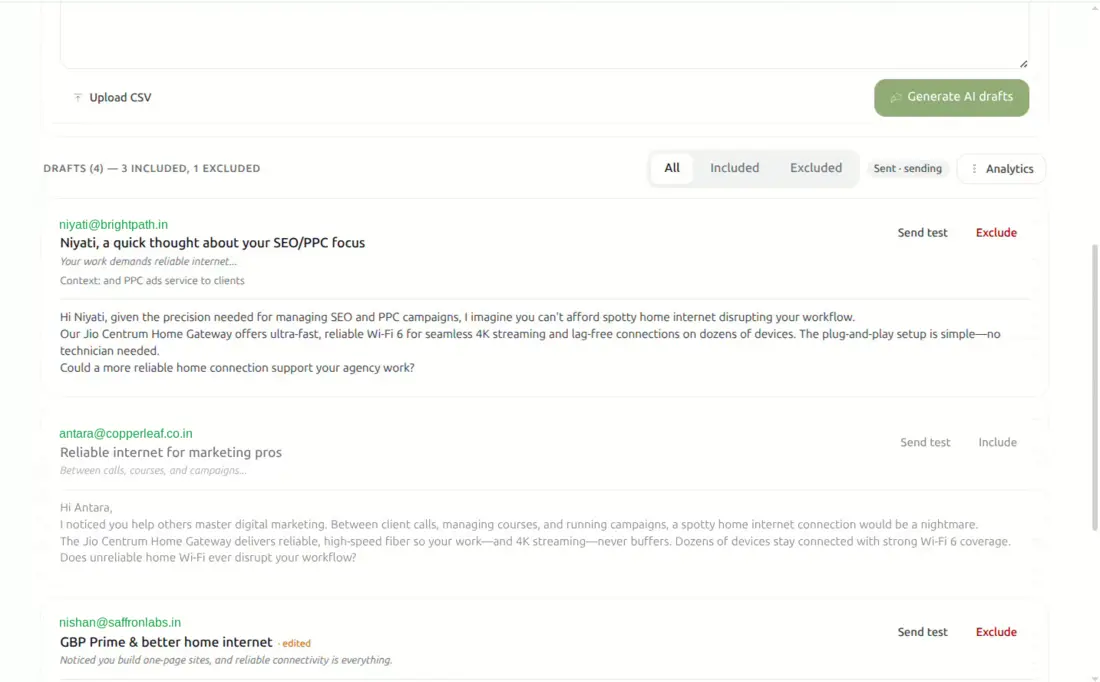
For the prospects worth real effort. Paste them in or upload a CSV, and the AI reads each company’s own website before writing. Every email opens with something true about that particular business — a different first line for every single contact. Review, exclude, then send.
 Runs itself
Autopilot
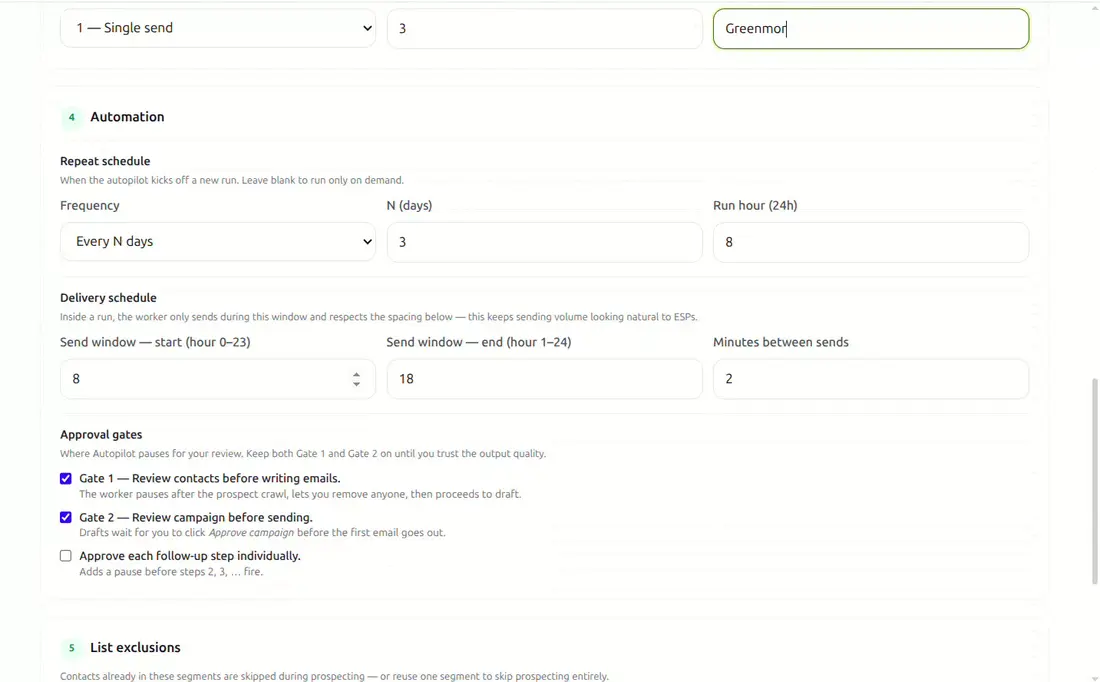
Describe your offer once — the benefit, the problem it solves, the tone you want. Then set how often it should go looking for new prospects and when it may send. It prospects, drafts and sends on a schedule, and stops for your approval wherever you tell it to.
Your list looks after itself
The fastest way to ruin a sending domain is to keep mailing people who never asked, or who already told you to stop. Outreach handles both sides of that quietly, in the background.
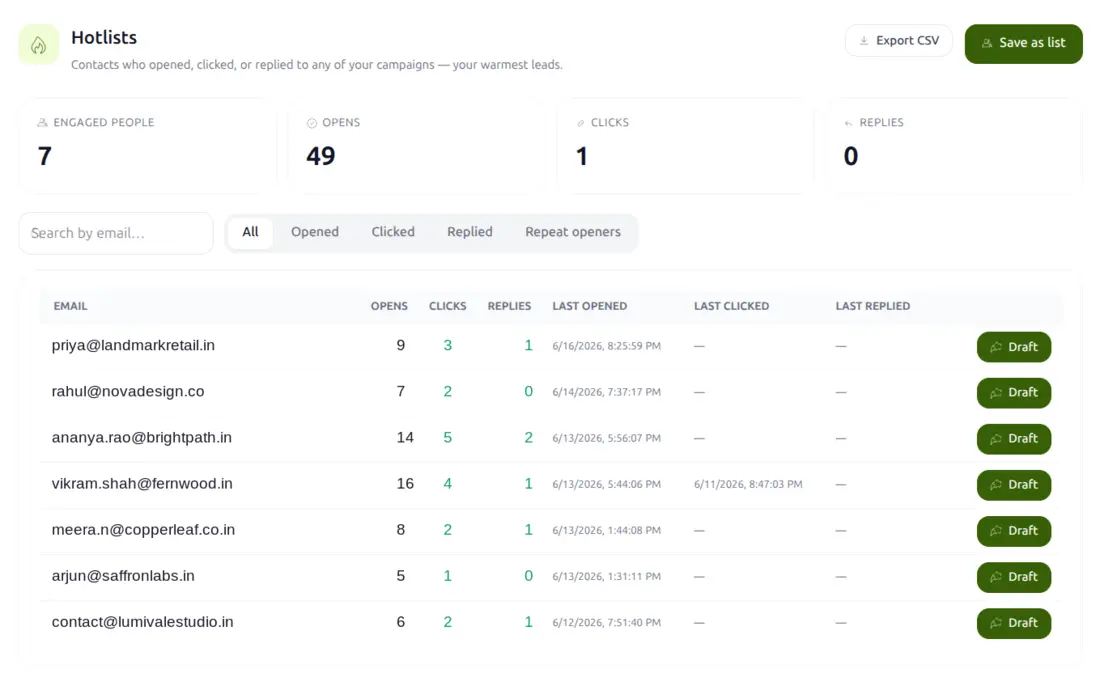
Hotlists — your warmest contacts, collected
Everybody who opens, clicks or replies to any of your campaigns gathers here automatically, with their engagement counts and the dates beside them. Draft to any of them in one click, export the list, or save it as a segment and run a follow-up campaign to the warm half only.
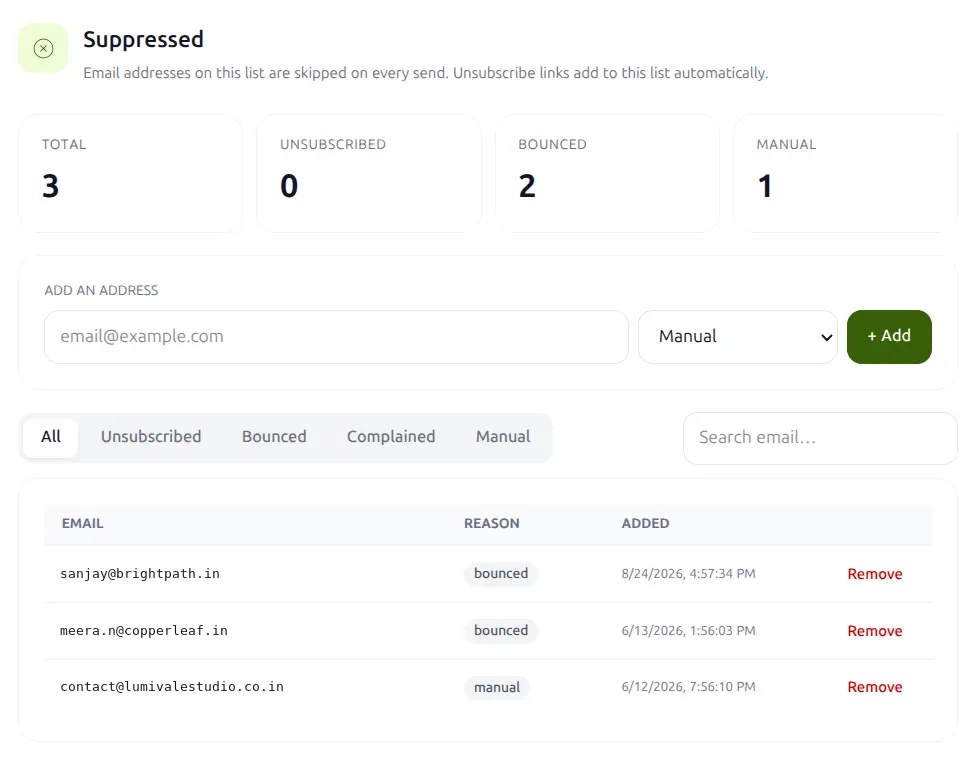
Suppression you never have to remember
Every unsubscribe, hard bounce and complaint lands on the suppressed list and is skipped on every send after that — across every campaign, not just the one it came from. You can add addresses by hand too, and see exactly why each one is there.
Sending responsibly is a condition of use. Outreach is built for genuine business-to-business contact, with verification, pacing, suppression and a per-mailbox daily cap to keep your domain healthy. Bulk sending is permitted under our Terms of Service and Anti-Spam Policy, and we may throttle or withdraw the facility for a mailbox that abuses it — while your ordinary email keeps working.
Let your website feed your campaigns
Anyone who fills in a form on your site can be enrolled automatically, starting at step one of whichever sequence you choose.
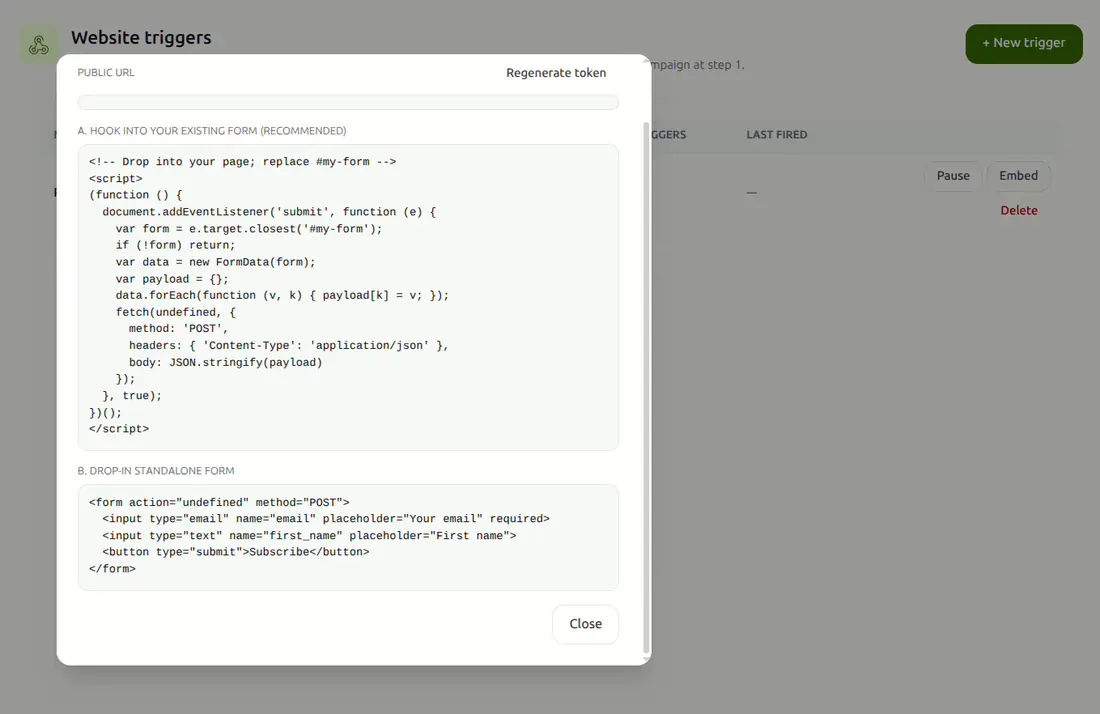
Website triggers
Create a trigger, choose the campaign it should enrol into, and drop one snippet onto your page. It hooks into the form you already have — Forminator, Contact Form 7, Elementor or plain HTML — or you can use the ready-made drop-in form instead. New submitters can be added to your contacts at the same time.
Everything in one list
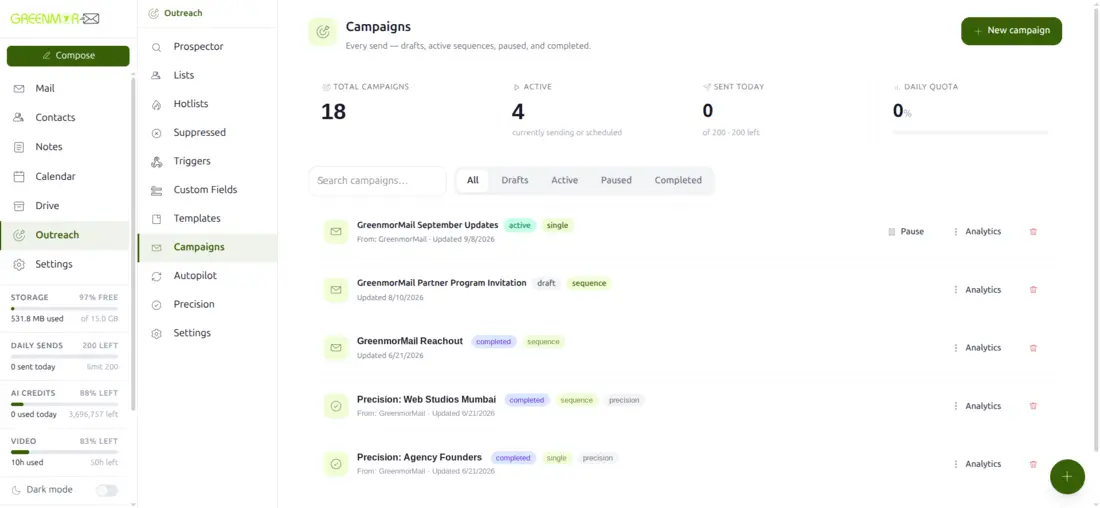
Drafts, active sequences, paused and completed campaigns sit together, with the day’s sending quota in view. Open any of them for its analytics, duplicate a winner, or pause something mid-flight without touching the rest.
Before you start
Do I need a separate subscription for Outreach?
No. Outreach is part of your GreenmorMail mailbox. It uses the same login, the same contacts and the same sending reputation — there is nothing extra to buy and nothing to keep in sync.
Will this hurt my domain’s reputation?
Not if you use it as intended. Addresses are verified before you send, messages are spaced out rather than fired in a burst, sending is confined to the hours and days you choose, and unsubscribes and bounces are suppressed automatically and permanently. A per-mailbox daily cap is the final backstop.
How many emails can I send in a day?
Each mailbox has a daily sending limit, shown in your sidebar as you work. Outreach counts against that same allowance as your normal email, so you always know where you stand. If you need more headroom, the limit can be raised on request.
Where do the prospects come from?
You describe the kind of business you want to reach and the AI turns that brief into structured search parameters; the crawler then returns verified business contacts that match. You can also skip prospecting entirely and bring your own list by paste, CSV or from your contacts.
What is the difference between Precision and a normal campaign?
A normal campaign sends the same well-written message to everyone on the list, with merge fields for names and company details. Precision writes a genuinely different opening for each contact, based on that company’s own website. It is slower and more deliberate — meant for the prospects that justify the effort.
Can I stop an automated campaign once it has started?
Yes. Campaigns can be paused mid-flight, and Autopilot’s approval gates let you review both the contacts it found and the drafts it wrote before anything is sent. Nothing leaves your mailbox that you have not allowed.
Does it work with the rest of GreenmorMail?
It is the same product. Replies arrive in your normal inbox, prospects can be saved to Contacts, attachments come from Drive, and meetings you book off the back of a reply go straight into your Calendar.
Send well, not just often
Outreach only works if your mail arrives. These go deeper on the parts that decide that.
Try Outreach on your own list
Every GreenmorMail mailbox includes Outreach. Start a 14-day free trial, import a list you already have, and send your first sequence today.