
Chat about an email on the email itself
Some mail needs a second opinion before you reply. Discuss gives every message a private conversation of its own, visible only to your team — so the question, the answer and the email that started it all stay in one place. Nothing forwarded, nothing pasted into chat, nothing lost.
- Private to your team
- Never seen by the sender
- No extra app, no extra login
The whole feature, in under two minutes
Starting a discussion, choosing who is in it, writing a reply, the flag your colleague sees, and finding every discussed email later — every screen here is the real product.
1:44 · no sign-up needed to watch
The forward, and everything that goes wrong after it
You know the shape of it. An email arrives that you cannot answer alone, so you send it on to a colleague with “thoughts?” at the top. What happens next is the problem.
The thread splits in two
There is now the original email and a forward of it, and the useful discussion happens in the copy. Six weeks later you open the original and there is no trace of the decision anywhere near it.
The context goes missing
Move it to chat instead and you spend the first three messages explaining which email you mean, pasting quotes, and hunting for the attachment that was already sitting in the inbox.
One reply-all away from disaster
An internal opinion and the customer’s address in the same thread is a mistake waiting for a tired Friday afternoon. Discuss has no path to the sender at all — there is nothing to slip.
Nobody can find it later
The email is in the mailbox, the conversation is in a chat app, and the decision is in somebody’s memory. Discuss keeps all three in the same row of your inbox.
A conversation attached to a message
Discuss is not a chat app bolted to the side of your mail. It is a panel on the message itself, and it behaves the way the rest of the mailbox does.
On the email, not beside it
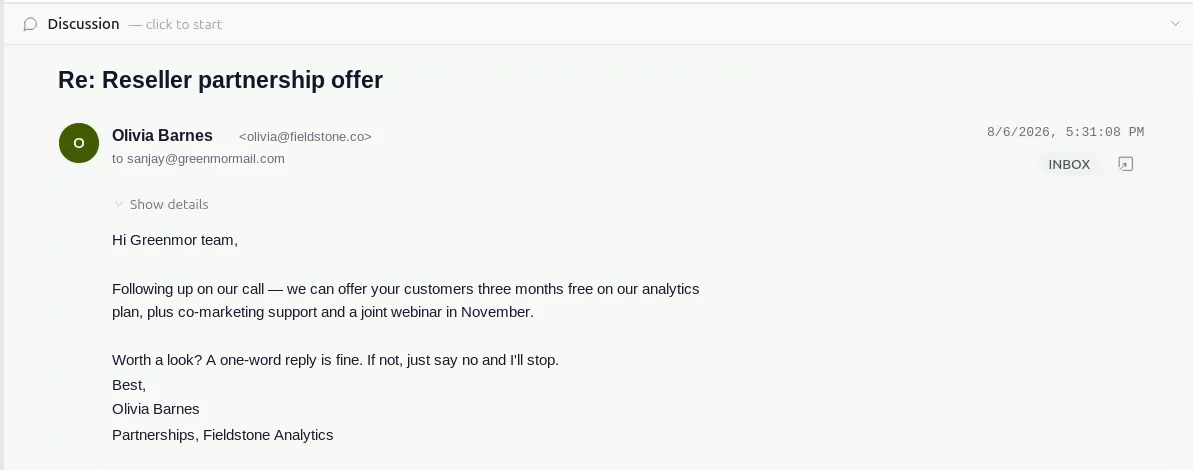
Every message in your mailbox carries its own discussion. Open the mail and the panel is at the top of it — empty until somebody starts one, then always there with the exchange inside.
Private, or the whole domain
Start it private and only the colleagues you name can see it. Open it to your domain and anyone on your team can read and join. You choose at the moment you create it.
People, suggested as you type
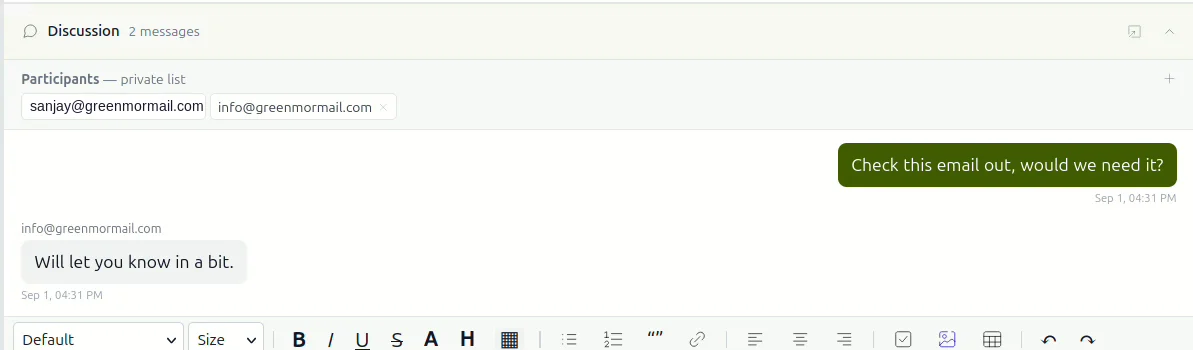
Add participants by address, with suggestions drawn from your own contacts. Add somebody later and they get the whole conversation, not just what happened after they arrived.
A proper editor
Headings, lists, links, quotes and tables — plus emoji and file attachments. It is the same editor you compose mail in, because there is no reason for an internal note to be plainer.
A flag, not a notification pile
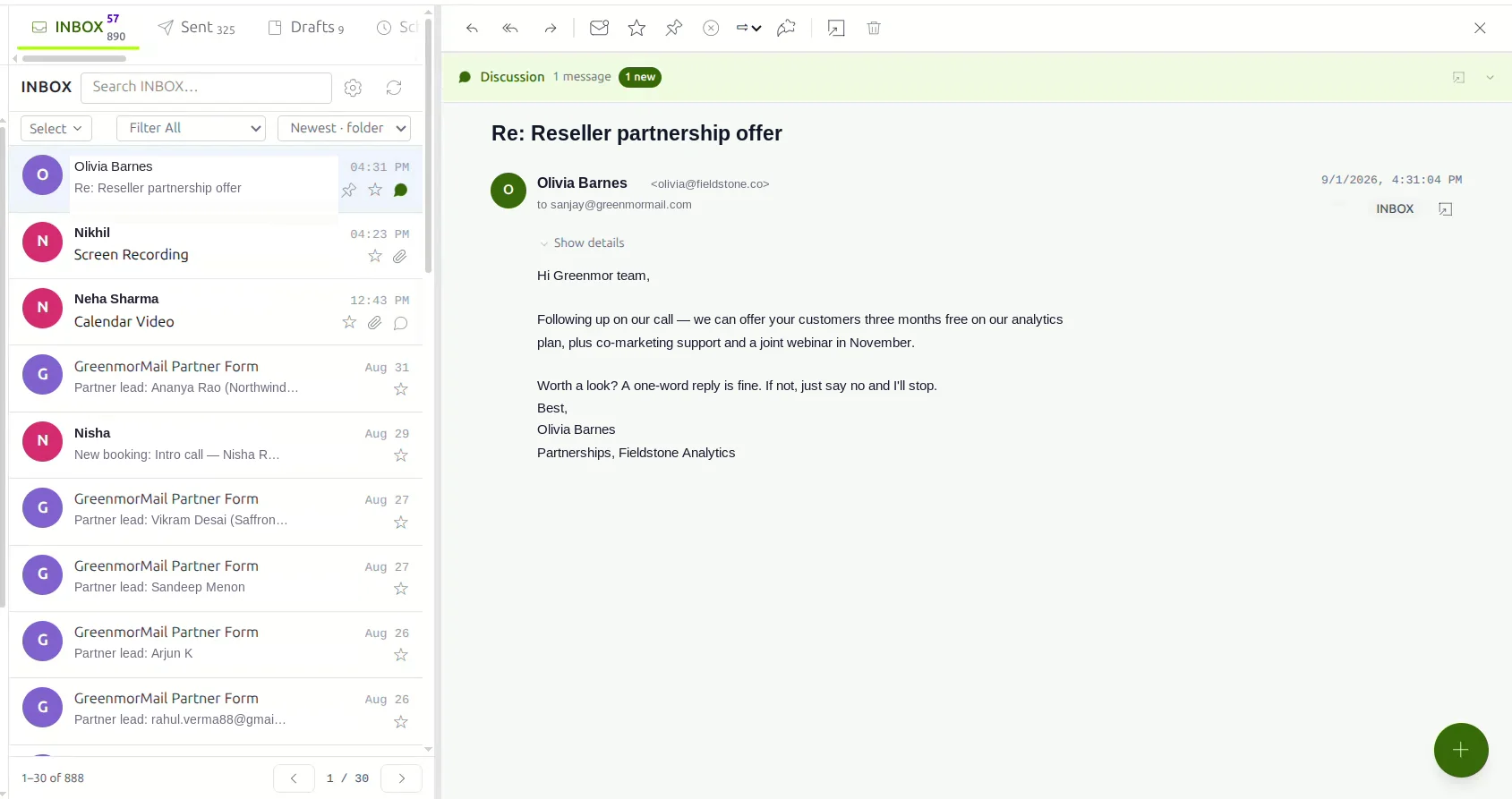
When there is something new, the message wears a small green flag in the list and the panel says how many. Open it and the count clears. No badge to dismiss in a second application.
Filter your inbox by it
“With discussion” sits in the same filter menu as Unread, Starred, Pinned and With attachments — one click for every email your team has actually talked about.
Five steps, and none of them leave the inbox
Nothing to install, nothing to configure. Every mailbox has this on the day it is created. Click any screenshot to see it full size.

Open the mail, start the discussion
The panel sits above the message, quiet until it is needed. On an email nobody has talked about it simply says so, with a single button to begin. There is no separate place to go and no link to copy — you are already where the conversation belongs.
The discussion is tied to that specific message, so it follows the email rather than a folder or a label. File the mail wherever you like; the conversation goes with it.
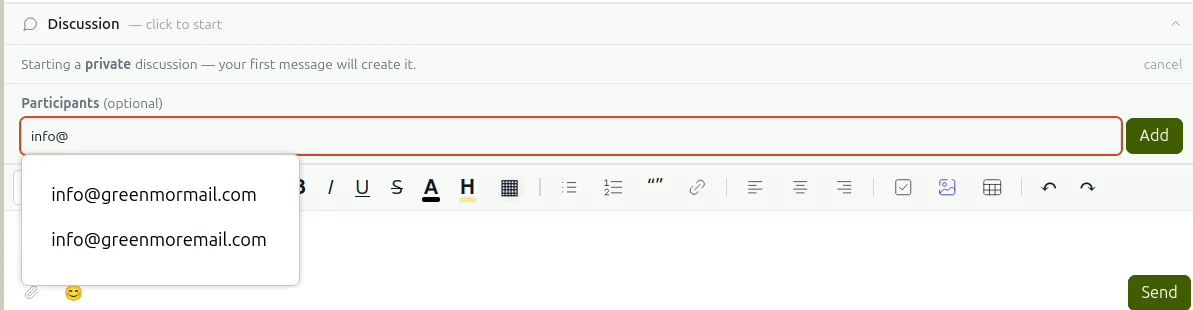
Decide who is in it
A new discussion is private by default: it exists only for the people you name. Start typing and the participants field suggests addresses from your contacts, so you are not copying them out of another window.
If it is something the whole office should see — a supplier’s price change, a policy question — open it to your domain instead and anyone on your team can read and join it.
Nothing is created until you send the first message, so an abandoned start leaves nothing behind.
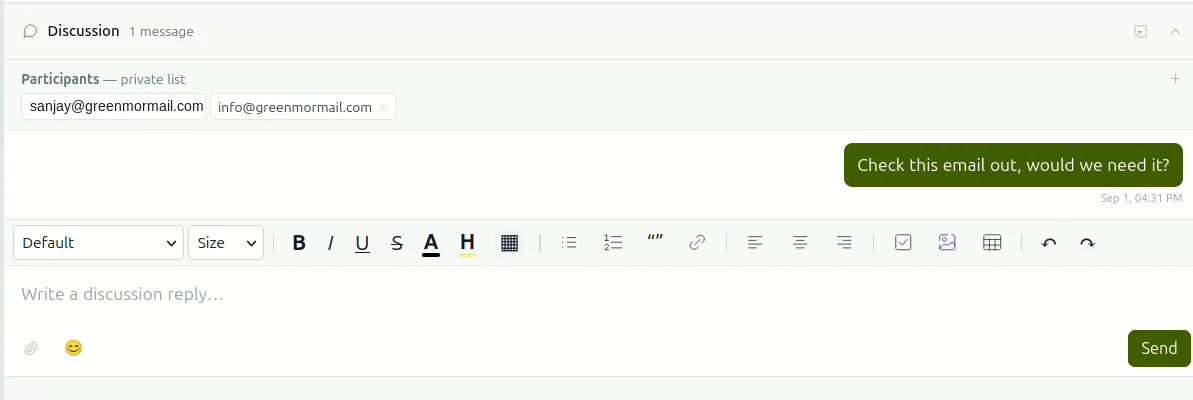
Say what you need to say
Write properly. The composer carries the same formatting as the mail editor — headings, lists, links, quotes, tables — along with emoji and attachments, so a number, a screenshot or a draft reply can go straight into the thread.
Messages appear as they are sent, for everyone with the email open. Nobody has to refresh, and nobody has to be told to look.
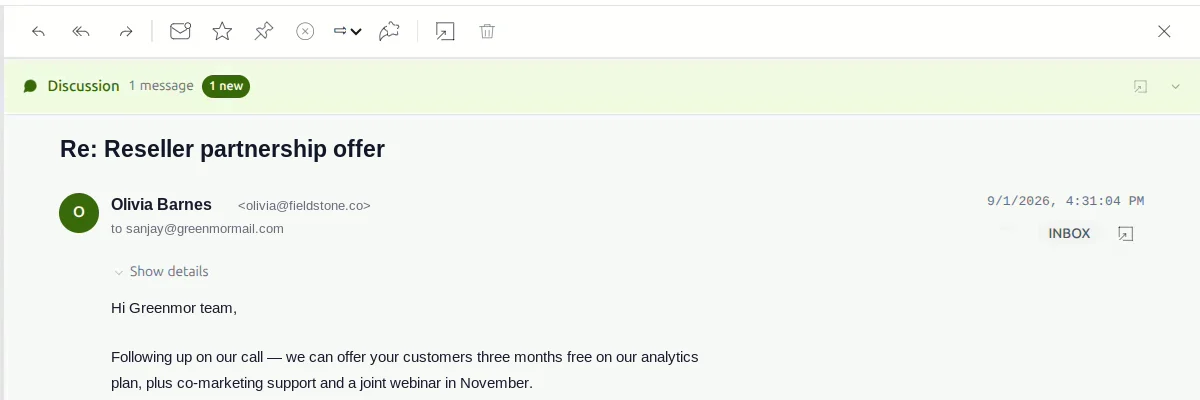
Your colleague sees it where the mail already is
No invitation email, no “did you see my message?”. The email they already have wears a small green flag, and the panel tells them how many messages are waiting. They open the mail they would have opened anyway and the conversation is there.
Reading it clears the count. There is no second inbox to keep on top of.
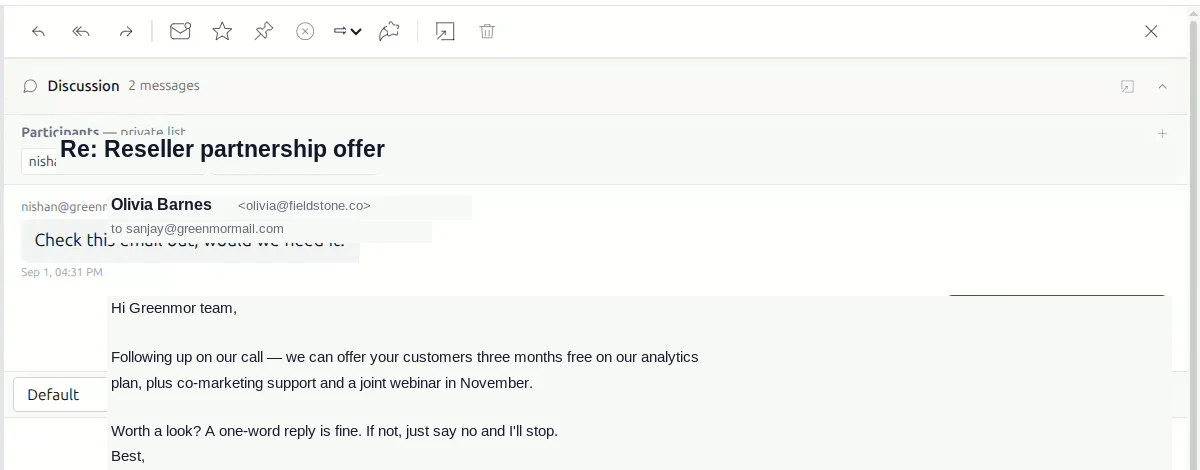
They reply on the same screen
The answer lands underneath, on the same message, in front of the same email everyone is talking about. No switching applications, no explaining which thread you mean, no pasting the original in so the other person has something to go on.
When the decision is made it is recorded against the email that prompted it — which is exactly where the next person to open that email will look for it.
Every email your team has talked about, in one list
A discussion is only worth having if you can find it in November. Discuss is a filter on your inbox, not a folder you have to remember to use.
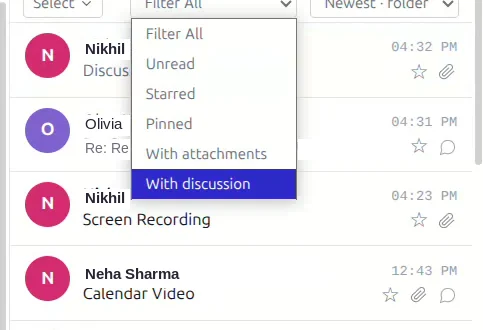
It sits with the filters you already use — no new menu to learn.
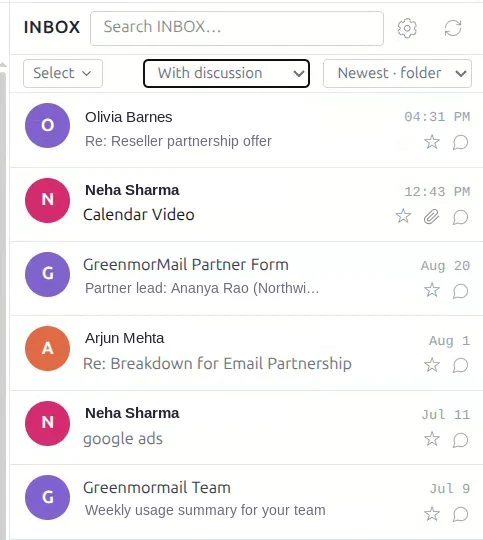
One click and the inbox shows only the mail your team has discussed.
Because the discussion is attached to the message and not to a folder, the filter keeps working after you file, archive or move the mail. Combine it with search and you can go from “that supplier thing we argued about” to the exact email, with the argument attached, in about four seconds.
Internal means internal
This is the part worth being precise about, because the whole feature rests on it.
The sender never sees it
A discussion is not part of the email. It is never attached to the message, never quoted into a reply and never delivered anywhere. The person who wrote to you has no way of knowing one exists, because nothing about it ever leaves your domain.
Scoped to your domain
Every discussion belongs to one domain and one message. A private one is limited to the people named in it; a domain-wide one is open to your team and nobody else. There is no public mode and no shareable link.
It follows your data region
Discussions live with your mailbox, in the region you chose when you signed up. If a colleague is hosted in another region, their replies reach them without your conversation leaving yours.
No ads, no profiling
The same rule as the rest of GreenmorMail. Your mail and your internal conversations are not scanned to build a profile and are not sold on. You are the customer, not the inventory.
Frequently asked
Can the person who sent the email see the discussion?
No. A discussion is never part of the message and is never sent anywhere. It is stored against the email inside your own domain and shown only to the colleagues in it. The sender has no way to see that one exists.
What is the difference between private and domain-wide?
A private discussion is visible only to the people you name as participants. A domain-wide one is visible to everyone on your domain, so anyone on your team can read it and join in. You pick which when you start it.
Can I add someone after the discussion has started?
Yes. Add them to the participants at any point and they get the whole conversation from the beginning, not just the messages sent after they joined.
Can I attach a file to a discussion message?
Yes. Attachments and emoji both work in the discussion composer, along with the same formatting you get in the mail editor — headings, lists, links, quotes and tables.
How do I know there is something new?
The email carries a small green flag in the message list and the panel shows a count of unread messages. Opening the discussion clears it. Messages also appear live while the email is open, so you do not need to refresh.
Does it work if my colleague is in another country?
Yes. Discussions are replicated to your colleague’s mailbox wherever it is hosted, so a team split across our India, Europe and United States regions can hold one conversation. Your data stays in the region you chose.
How do I find discussions later?
Use the With discussion filter in your inbox, next to Unread, Starred, Pinned and With attachments. It shows every email that has a conversation attached, and it keeps working after you have filed or archived the mail.
Does it cost extra?
No. Discuss is part of every GreenmorMail mailbox at no additional charge, with no per-user add-on and nothing to enable. It is available during the 14-day free trial.
The rest of the suite
Discuss is one part of it. These share the same login, the same contacts and the same 15 GB.
Stop forwarding your own email to yourself
Start a 14-day free trial, open the last message you had to ask somebody about, and have the conversation where it belongs.