
Let it do the reading and the first draft
Most of the time email costs you is not typing. It is catching up on a thread you were added to halfway through, working out what was actually agreed, and starting the hundredth reply of the week from an empty box. The GreenmorMail assistant does those parts — inside the mailbox you already have open, on the model you choose.
- 200,000 tokens included
- Or bring your own key, zero markup
- Off by default until you switch it on
Summarising, drafting and composing, in under two minutes
A real thread summarised, a reply drafted from it, a whole email written from a single line of instruction, and the sentence-completion that runs while you type. Every screen in this video is the actual product.
1:51 · no sign-up needed to watch
The expensive part of email is not the typing
It is everything around it — the catching up, the deciding, and the blank box you stare at before the first sentence arrives.
Threads you joined late
Somebody adds you to a chain that has been running for a fortnight. Before you can be useful you have to scroll to the bottom, read upwards, and reconstruct who promised what. That is ten minutes gone before you have typed a word.
Decisions buried in paragraphs
The one line that matters — the date everyone finally agreed, the number that was accepted — is usually halfway down somebody’s fourth reply, between two pleasantries and a forwarded attachment.
The same reply, again
Most business email is not original. It is a polite acknowledgement, a proposed time, a chase, a thank-you. Writing each one from nothing is the tax you pay for a mailbox that cannot help.
And tools that live somewhere else
Pasting a thread into a chatbot in another tab, then pasting the answer back, is slower than writing the reply. Help is only help when it is already where the mail is.
Six things, all inside the mailbox
No separate app, no copying and pasting, no second subscription to manage.
Summarise a thread
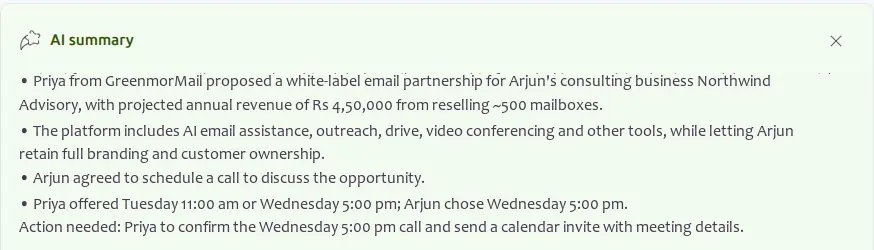
Turns an entire conversation into a handful of lines — what was proposed, what was agreed, and who chose what — then finishes with the action still outstanding.
Draft the reply
One button from the summary. It has already read the thread, so the draft answers what was actually asked instead of producing something generic.
Write from one line
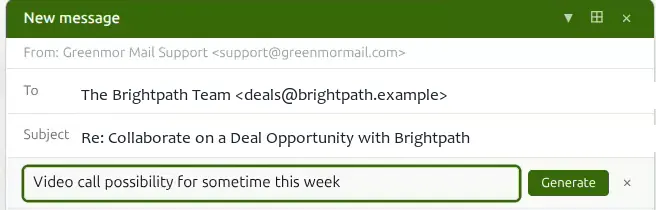
Tell it what the email should say — “video call possibility for sometime this week” — and it writes the whole message, signature and all.
Finish your sentences
Smart Compose suggests the next few words as you type. Press Tab to take them, or keep typing and the suggestion disappears.
Improve what you wrote
Shorten a rambling paragraph, suggest a subject line for a message that has drifted, or ask for a specific change to the draft in front of you.
Power the Outreach tools
The same engine writes campaign copy, per-contact opening lines and follow-up sequences in Outreach — one setting, one balance, both places.
Catch up on a thread without reading it
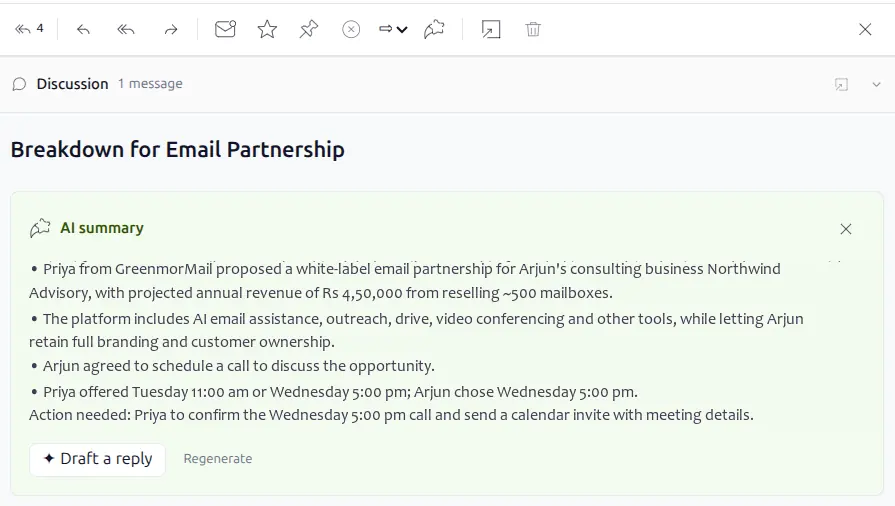
The summary sits on the message itself, so there is nothing to open, paste or switch to.
Who said what, in five lines
Open the thread and ask for a summary. What comes back is not a paraphrase of the last message — it is the whole conversation reduced to the points that carry information: the proposal, the terms, the objection, the answer.
Summarising runs on the base tier, so it is the cheapest thing the assistant does.

And what is still waiting on you
Every summary ends with the action outstanding, named against the person who owes it. When that person is you, Draft a reply is right there — and because the thread has already been read, the draft answers the real question.
Not quite right? Regenerate asks again without going back to the thread.
Start from an instruction, not an empty box
Three different ways in, depending on how much you already know about what you want to say.
Say what the email is for
A prompt bar sits above the composer. Type the gist in plain words — the length of a text message is plenty — and press Generate. You are describing the intent, not writing the email.
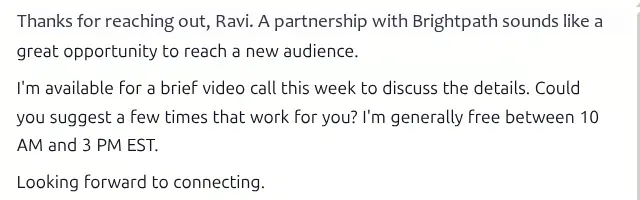
It writes the message, not a fragment
The draft lands in the composer as ordinary editable text: an opening that refers to what came before, the substance, a close. It is a starting point you correct, never something that sends itself.
Drafting runs on the premium tier — the better model, because this is the part worth getting right.
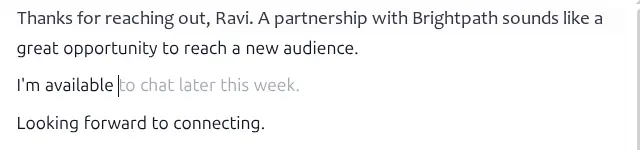
Or just type, and let it keep up
When you would rather write it yourself, Smart Compose stays a few words ahead in grey. Press Tab and the suggestion becomes your text; carry on typing and it quietly gets out of the way.
Nothing happens unless you ask for it
The assistant has no standing permission to act. Every summary, draft and suggestion is something you requested, and every one of them can be switched off.
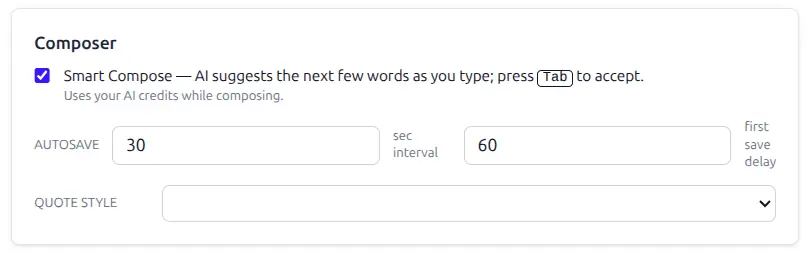
One checkbox for the one that runs on its own
Smart Compose is the only feature that acts while you type, so it gets its own switch in Composer settings — and it tells you plainly that it spends credits while it works. Everything else waits to be clicked.
Nothing is ever sent automatically. The assistant writes into the composer; you press Send.
Your administrator decides who gets it
AI is enabled per mailbox from the admin console. A domain can switch it on for a couple of people, for everybody, or for nobody at all — and change its mind later without touching anyone’s mail.
Every call is metered and logged
Each request records the model used, tokens in and out, how long it took and what it cost. There is no mystery line on a bill at the end of the month — the balance is on screen in the sidebar as you use it.
It tells you before it spends more
If a model wants to think for longer than the ceiling allows, the assistant stops and says so rather than quietly burning through your balance and returning nothing.
Off is a real setting
Disabled means disabled — no buttons, no prompt bar, no background calls. The mailbox behaves exactly as it did before, and nothing about your mail is sent anywhere.
Bring your own key, or buy credits from us
This is the part most email providers do not give you. The intelligence behind the assistant is a setting, not a decision somebody else made on your behalf.
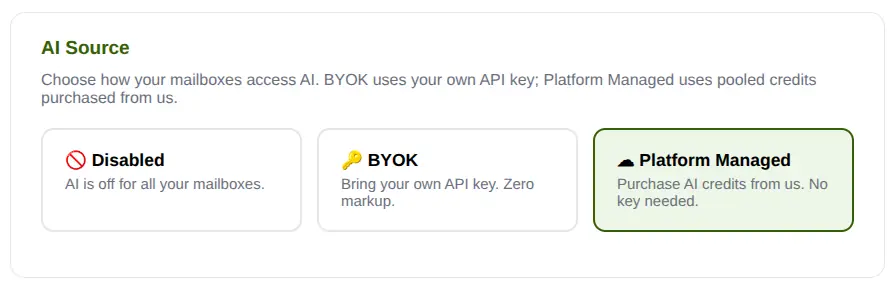
Three ways to run it
Disabled turns AI off across your mailboxes. BYOK uses your own API key with no markup on top — you pay your provider directly, at their prices. Platform Managed uses credits bought from us, with no key to obtain.
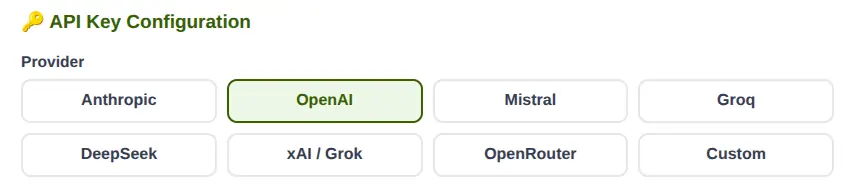
Eight providers, and anything else that speaks the same language
Anthropic, OpenAI, Mistral, Groq, DeepSeek, xAI, OpenRouter — or Custom, which is any endpoint that talks the OpenAI format, including one you host yourself. Change your mind next month and it is a dropdown, not a migration.
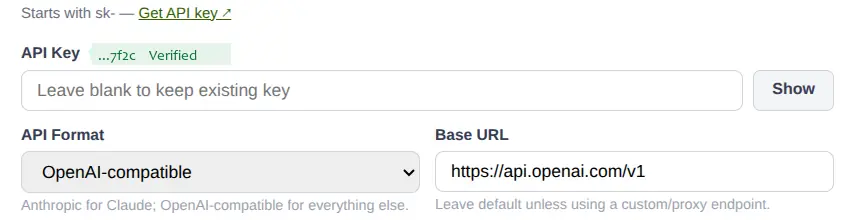
Checked when you save it, then encrypted
Paste the key and test it before committing — a real call goes out and comes back verified, so you find out immediately rather than the first time somebody needs a summary. The key is stored encrypted and is never shown back to you in full.
A base URL field lets you point at a proxy, a gateway or a self-hosted model.
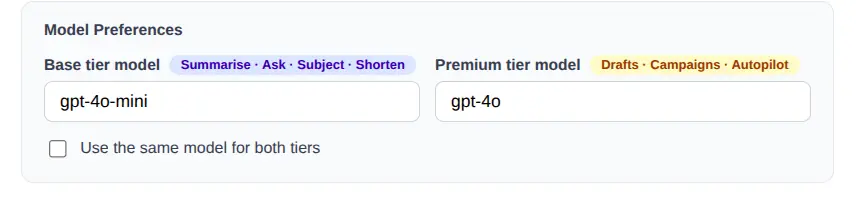
A cheap model for the easy jobs, a good one for the hard ones
Two tiers, and you name the model for each. The base tier handles summarising, asking, subject lines and shortening. The premium tier is used for reply drafts, campaigns and Autopilot. Paying top rates to shorten a paragraph makes no sense, so GreenmorMail does not.
One tick box makes both tiers the same model if you would rather not think about it.
Enough included to find out whether you want it
200,000 tokens with every mailbox
Every new mailbox starts with an allowance included — enough to summarise a great many threads and draft a great many replies before you have decided anything. No card, no separate AI plan, nothing to switch on at checkout.
Then your key, at your provider’s price
Switch to BYOK and GreenmorMail takes nothing on top. The request goes to your own account with your own provider, billed by them, at whatever rate you have negotiated. We are not in the middle of that transaction.
Or top up credits and forget about it
If obtaining an API key is not how you want to spend an afternoon, buy credits from us instead. Same features, same models, no account to open with anybody else.
The rest of the mailbox is unaffected
Run out, or never turn it on, and everything else carries on exactly as before. AI is an addition to the mailbox, never a dependency of it.
Frequently asked
Where does my email content actually go?
To the model provider you have chosen, for the length of that one request. On BYOK it goes to your own account with that provider, under your contract with them, using your key. On Platform Managed it goes through our account instead. Either way it is only the thread or draft the request needs, only when you ask, and it is not used to build any profile of you here.
Which providers can I use?
Anthropic, OpenAI, Mistral, Groq, DeepSeek, xAI, and OpenRouter as an aggregator — plus a Custom option that accepts any endpoint speaking the OpenAI API format, including a model you host yourself. You can also set a base URL to route through a proxy or gateway.
What does “zero markup” mean?
That when you use your own API key, GreenmorMail adds nothing to what your provider charges. The call is made with your key against your account and appears on their bill, not ours. We do not resell those tokens to you at a margin.
How much is 200,000 tokens in practice?
Tokens are roughly three-quarters of a word each, counted on the way in and the way out. Summarising a long thread is cheap because it runs on the base model; drafting a reply costs more because it runs on the better one. It is an allowance for trying the feature properly, not a monthly quota.
Can I stop it writing while I type?
Yes. Smart Compose is the only feature that runs by itself, and it has a checkbox in Composer settings. Clear it and nothing is requested unless you press a button. Turning AI off entirely is a separate setting that removes the buttons too.
Can I choose who in my team gets AI?
Yes. It is enabled per mailbox from the admin console, so you can give it to the people who will use it and leave everybody else untouched. Changing it later takes effect at their next request and does nothing to their mail.
Does it work on my connected Gmail or Outlook account?
Yes, with one difference: mail in a connected external account uses platform-managed credits rather than your own API key. Everything in your GreenmorMail mailboxes can use either.
Will it send anything on my behalf?
No. The assistant writes into the composer and stops. Nothing leaves your mailbox until you read it and press Send — including drafts it produced itself from a summary.
The rest of the suite
One login, one set of contacts, one 15 GB. The assistant reaches into several of these.
Try it on your own inbox
Start a 14-day free trial, open the longest thread you have been ignoring, and ask it what happened. The allowance is already there — there is nothing to buy first.